Showing posts with label tool. Show all posts
Showing posts with label tool. Show all posts
0
其实从官网就可以看出这款软件的功能,简而言之,能够简化你重复输入的东西。
Screenshot:

How to use:
Doit.im
一款界面简洁,操作简单的GTD软件,基于AIR平台。可以在不同电脑上进行同步。
Under the guidance of the excellent task management principles of GTD®, Doit.im conducts you to have your head cleared, to get rid of various pending ideas on your mind, and helps you organize tasks and focus on items in hand, so that you can closely track the process of your work and feel easy when faced with bulks of complicated projects. With no pressure but efficiency, you'll further enjoy your work and achieve unexpected success.

Posted on
Thursday, March 11, 2010
by
醉·醉·鱼
and labeled under
Doit.im
,
dropbox
,
Phrase Express
,
tool
Phrase Express其实从官网就可以看出这款软件的功能,简而言之,能够简化你重复输入的东西。
Screenshot:

How to use:
- Download the install file from http://www.phraseexpress.com/download.htm
- Install this software.
- Create a new phrase, such as www.douban.com
- Set the Autotext: ##db Execute immediately
- Open Notepad and input "##db" and you will see the text www.douban.com.
Doit.im
一款界面简洁,操作简单的GTD软件,基于AIR平台。可以在不同电脑上进行同步。
Under the guidance of the excellent task management principles of GTD®, Doit.im conducts you to have your head cleared, to get rid of various pending ideas on your mind, and helps you organize tasks and focus on items in hand, so that you can closely track the process of your work and feel easy when faced with bulks of complicated projects. With no pressure but efficiency, you'll further enjoy your work and achieve unexpected success.

-
将需要做的事情放到inbox,比如看《晨间日记的奇迹》
-
将需要今天做的事情更新到Today,或者next actions。
-
完成以后就可以在completed里面看见。
-
查看next actions或者inbox,重新考虑需要做的事情。
网络硬盘,同样的服务有drop.io,box.net,Rapid
Share,SVN等。下载软件以后,软件会在本地创建一个folder。以后可以在不同的电脑上对该folder内的文件进行编辑,备份等。比如,在公司的工作没有做完,希望回家做,但是又没有带U盘(remote就算了吧,折腾我可怜的电脑。),这个时候用dropbox就好了。以后还可以在不同的电脑上进行同步更新。
0
应大天使的要求,自己将自己常用的tools推荐给大家。
Lauchy - 快速启动软件
Screenshot:
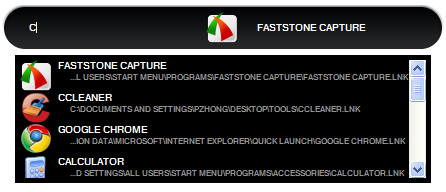

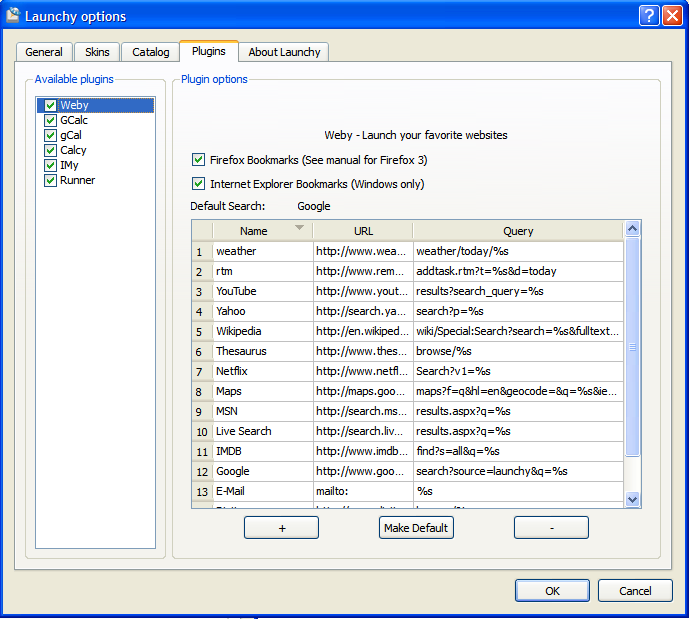
Lauchy - 快速启动软件
Screenshot:
- 如图1中所示,用户可以快速启动在本机上安装的软件,也可以具体到某个文件夹或文件,大大节约了自己在不同文件夹中往返寻找文件。比如,用户如果希望到D盘program files文件夹,那么可以这样操作:
- Alt + Space 调出Launchy界面
- 输入 C:/ (而实际上它会自动切换成为 C:\)
- 再输入pro,按tab键,再敲回车,该文件夹就打开了。
- 有些软件自己安装的时候是绿色软件,那怎么办?这个时候可以在桌面上建立一个folder,将这些软件的快捷方式放进去。再对Launchy进行一些配置:
- Alt + Space 调出Launchy界面
- 鼠标右击界面,调出options
- 在catalog 选项卡下,添加刚才创建的folder。file type选择*.*(即该文件夹内所有文件)。
- 点击Rescan catalog按钮,再点ok。这个时候就可以快速启动该文件夹里面的文件了。
- 在Launchy->options->General 选项卡下,可以自定义hotkey。
- plugin 插件永远是个好东西,比如我们可以快速调出msn,省去了去寻找联系人的时间。
- 下载 http://dl.dropbox.com/u/3034437/imy.dll
- 将文件放到 X:\Program Files\Lauchy\plugins 文件下
- 重启Launchy
- 稍等片刻之后,输入某个联系人的前几个character,回车即可。
- plugin weby的使用
- Alt + Space 调出Launchy
- 输入google
- 按Tab键
- 再输出要搜索的东西即可快速在浏览器中搜索该内容。
- 快速计算
- Alt + Space 调出Launchy
- 输入2+9,稍等片刻即可
- 快速输入google calendar
- Alt + Space 调出Launchy
- 输入 gcal, 按tab键
- 输入自己希望录入的东西即可。